
The dashboard: your day at a glance
The Dashboard is the home page. It sums up what is happening today and what needs your attention. Every card is clickable.
Updated 14 October 2026
Read the header
You see the date, a greeting and a summary: “X arrivals, X departures and X guests in house today”. Two buttons: Open front desk and New reservation (only for those who can edit reservations).
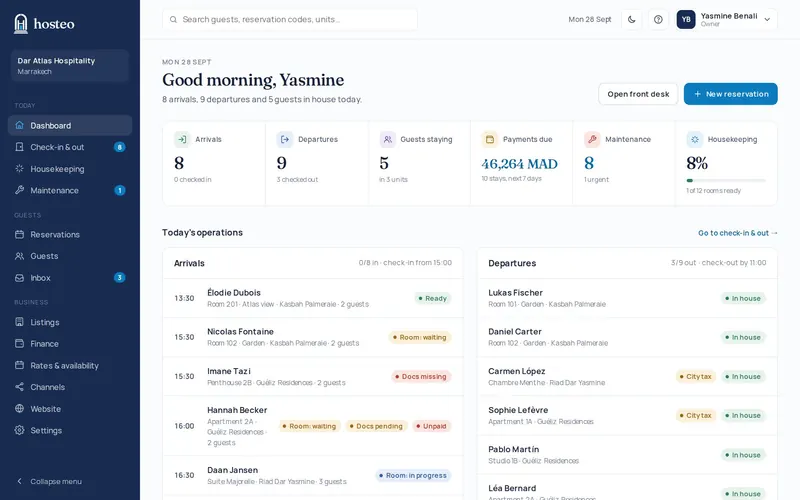
Go through “Today at a glance”
Six clickable cards: Arrivals, Departures (with how many are already checked out), Guests staying, Payments due (balances of stays arriving within 7 days), Maintenance (open and urgent requests) and Housekeeping (share of rooms ready).
Check today’s operations
Two panels, Arrivals and Departures, list each guest with their unit and badges (room status, documents, payment, city tax). A click opens the booking; the “Go to check-in & out →” link opens the day’s page.
Work through “Needs attention”
Up to 8 alerts, each with a link: an OTA booking that is overbooked, a website booking request waiting, a room not ready for an arrival, urgent or overdue maintenance, an amount to collect, missing documents for arrivals in the next 3 days, unanswered messages.
Follow recent activity
The team’s last 8 actions: handy to see who did what.