
Inbox: reply to guests and connect WhatsApp
The Inbox brings your guests’ conversations together. Reading needs access to messages; replying is reserved for the owner, the manager and reception.
Updated 14 October 2026
Open the Inbox
Inbox menu. Tabs: Open, Unread, Archived, All. A search and a filter by channel and status help you find your way.
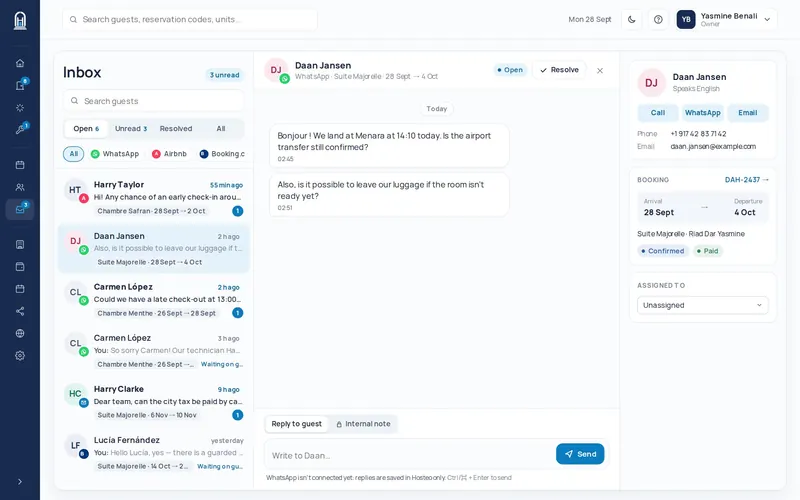
Read and reply
Click a conversation. The “Guest & booking” panel shows the booking and the registration status. At the bottom, choose Reply to guest or Internal note (the guest never sees it), then send (Ctrl or ⌘ + Enter).
Archive what is handled
Click Archive at the top of the conversation: only what is waiting stays in Open.
Connect WhatsApp (owner)
Profile menu → Settings → Integrations → Connect WhatsApp. A QR code appears: on your phone, WhatsApp Business → Linked devices → Link a device, then scan. The page updates by itself and shows “Connected”. “New code” makes another one if it expires.
Forward your email (owner)
Same page, Email card: Get my Hosteo email address. Forward your mailbox to that address (the instructions are on the page for Gmail, Outlook and your own domain): guest emails then arrive in the Inbox.